

***Last updated July 2026***
By VibeIncome, an online business expert with 8+ years of experience.

If you’ve been searching for fresh ways to generate unique and eye-catching images for your projects, ad creatives, or branding, the newest kid on the AI scene, Kre8or, is worth checking out. I’ve spent time exploring what this program can do, and honestly, it’s made image creation way more accessible. No advanced skills needed to get professional looking results.
What is Kre8or AI?
Kre8or is an online AI image generation platform built for those who want stunning visuals without the fuss. Powered by advanced neural networks and trained on a massive range of styles, it creates everything from photorealistic art to quirky digital illustrations. Even if you’re new to AI tools, you’ll find the interface extremely friendly. You type in your vision, adjust a few simple settings, and Kre8or does the heavy lifting.
The focus here is versatility. Kre8or serves designers, marketers, and small business owners who want disruptive images without paying a pro. At the same time, artists can use it to experiment with new styles or create quick drafts. Whether it’s a social media post, website banner, product mockup, or presentation slide, Kre8or spits out high quality images in minutes. No more blank canvas paralysis.
How Kre8or AI Image Generation Works
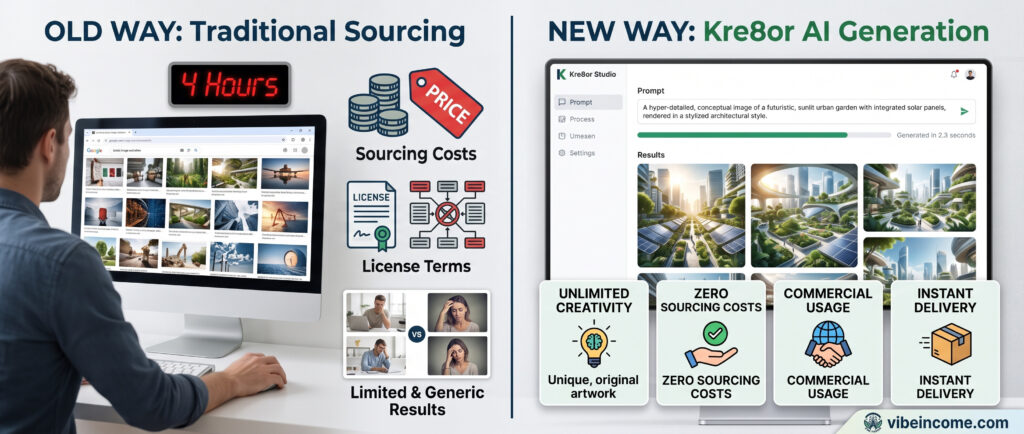
Kre8or opens up visual creation with text prompts. Just describe what you need, like “lush mountain landscape with misty clouds at sunrise” or “futuristic ad for an ecofriendly car,” and Kre8or cooks up several options instantly. The platform uses the latest diffusion models, making the details sharper and the colors more vibrant compared to older AI programs I’ve seen.
Unlike some AI tools that crunch your idea into something generic, Kre8or seems to “get” context better. That means if you need your art to look a certain way, mention the preferred style, mood, color palette, or even what feeling you want to evoke. There are adjustable settings for aspect ratio, output size, detail level, and visual style, so you can really zero in on what fits your needs.
- Text to Image: Type in a prompt and generate custom artwork, graphics, or ad visuals within seconds.
- Style Control: Add stylistic keywords and watch Kre8or switch from cartoonish to ultramodern or anything in between.
- Batch Generation: Get several results per prompt to choose from, which is a massive time saver.
- In Browser Editing: Make quick tweaks before downloading, cutting out the back and forth with external editors.
- HD Output: Export images at print ready resolution or optimized for digital use. Perfect for any marketing or creative project.

Membership Options Explained
Kre8or is designed to work for anyone, from hobbyists testing new design ideas to agencies managing client campaigns. There are typically three tiers: Free, Pro, and Enterprise, each with different benefits. Here’s a breakdown of what you actually get:
- Free Plan: This no cost tier lets you try Kre8or with a set number of generations per month, standard resolution output, and watermarking. It’s great for exploring or making the odd personal project, but if you’re serious about marketing or branding, you’ll want more features.
- Pro Plan: Designed for frequent users, this plan increases your generation limits, gives you HD output without watermarks, and unlocks additional style packs. Personal and commercial rights are included, so you can use these images for your business, online content, or ads. Batch processing and advanced editing are included in this tier, which is pretty handy if you’re creating content often.
- Enterprise/Team Plan: If you’re working with a team or running campaigns at scale, this plan adds team management, priority access to new features, and larger generation caps. Usually, there’s a dedicated support rep and advanced API access for automating workflows or integrating Kre8or into your existing systems.
You get flexibility, letting you upgrade, downgrade, or cancel based on the projects ahead.
What Kre8or Can Do: Top Features
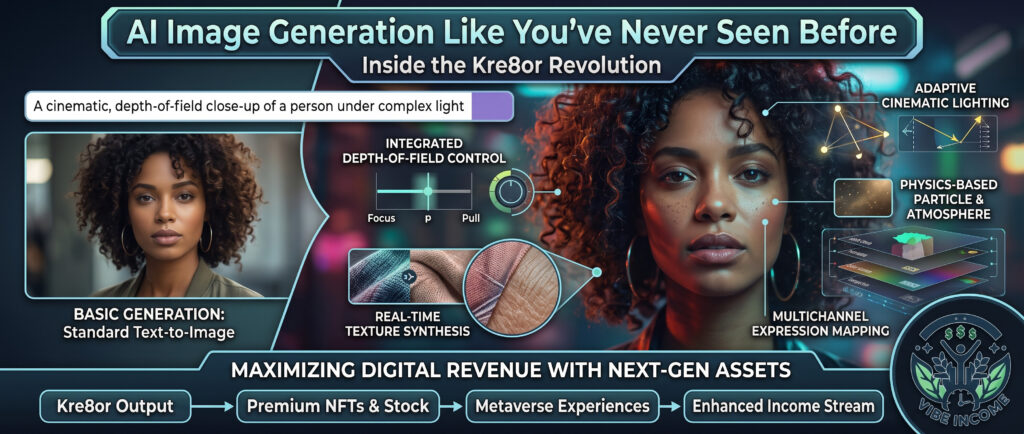
Kre8or packs in tools that go beyond simple image creation. Here’s what stands out and how you might use them for practical needs:
- Ad and Social Media Graphics: Create scroll stopping ads for Instagram, Facebook, LinkedIn, or Google Ads in just a few clicks. I’ve found this especially useful for small businesses and solopreneurs who need to compete visually without hiring a designer for every single creative.
- Branding and Mockups: Use Kre8or outputs for early branding concepts, website hero images, or product packaging previews. This is a game changer for those doing A/B testing of visuals or showing clients options.
- Inspiration and Drafting: Artists and illustrators can pump out quick concepts or mood board elements when brainstorming, then refine or paint over manually later.
- Blog and Website Banners: Bloggers and content creators can save time by whipping up featured images and banners that look polished, thematic, and on brand.
- Backgrounds and Textures: Use the platform for seamless backgrounds, unique patterns, or abstract graphics. These are ideal for everything from ecommerce sites to digital products.

Real World Benefits for Your Daily Workflow
The main value of Kre8or is how much it cuts down the time and hassle to create images that used to require graphic design chops or outsourced help. Here are a few ways it helps day to day:
- If you’re running ads or promotions, you don’t wait days for a designer; just generate, test, and launch quickly.
- For those unsure what look will convert, you can try several styles or ideas without paying more.
- The platform can replace a stack of expensive image subscriptions or asset packs for many users.
- Small businesses and creators share how Kre8or helped them polish their brand and compete with bigger teams.
Furthermore, Kre8or allows you to easily create unique images for newsletters and online marketing, saving money and speeding up production. If you often edit images for content or regularly need graphics for announcements, product launches, or courses, having Kre8or in your digital toolkit truly gives a boost to your workflow efficiency. Many marketing professionals mention how this tool reduces their time spent on sourcing or making graphics, allowing them to focus more on strategy and customer engagement. Even teachers and educators find it useful for sprucing up class materials or presentations.
Tips for Getting the Best Results with Kre8or
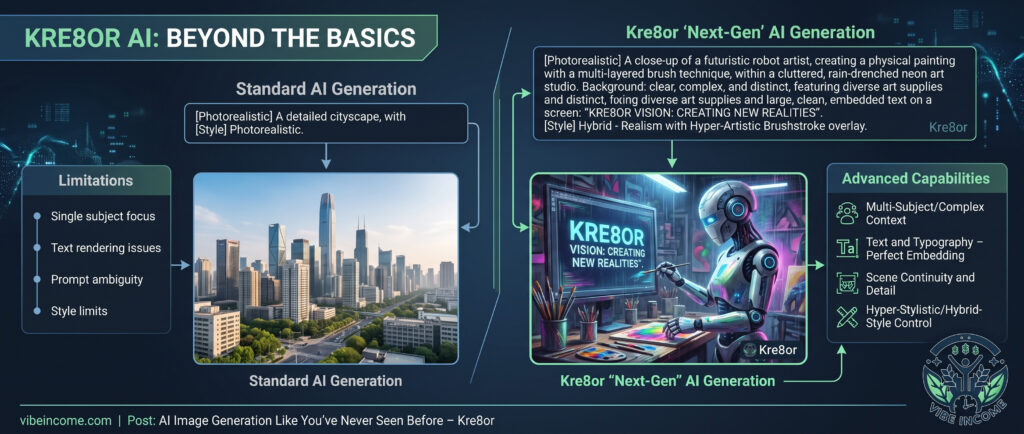
While the technology is smart, your results depend on your prompting and knowing a bit about what each setting does. Here’s what can help you get images that fit your project perfectly:
- Be detailed in your prompts. Mention the mood, colors, composition, and style you want. For example: “minimalist vector banner with blue and green gradients” or “high detail vintage poster style.”
- Use the style packs if you want a consistent look across campaigns or projects. These can be themed by industry, genre, or aesthetic.
- Try batch generation. You’ll often find one version that nails it, plus extras for future inspiration.
- Learn how the editing tools work. Even basic changes like cropping, vibrancy, and filters will give your images a truly customized feel.
- Check the help resources and explore community forums to pick up tips from experienced users. Practice with various prompts and settings to increase your skill in getting exactly what you picture in your mind.
Things Worth Considering Before Signing Up
Not every AI image generator is built the same, and a few factors can make your Kre8or experience smoother:
- Output Usage: Make sure you understand usage rights, especially if you’re selling designs or running public campaigns. Kre8or’s Pro and Team plans typically offer full commercial use.
- Branding Consistency: Use style presets and templates to keep your look consistent as your brand grows.
- Prompt Crafting: Results depend on good prompts. If your first image isn’t quite right, tweak your description until the vibe matches your vision.
- Subscription Flexibility: Plans let you scale up or down so you only pay for what you actually need.
- Performance: If you have tight deadlines or high-volume needs, check Kre8or’s image generation speed and reliability during your trial to see how it fits your pace.
Frequently Asked Questions about Kre8or
Question: Is Kre8or good for people who aren’t designers?
Answer: Absolutely. The whole platform is set up for non designers and those who want to create visually impressive work without complicated tools.
Question: Are the images copyright free?
Answer: Pro and Enterprise plans typically give you commercial rights, so you can use, edit, and publish images for your business. It’s wise to double check the current terms before starting a big campaign.
Question: Does Kre8or work for print projects?
Answer: Yes, you can generate high resolution images that are ready for print banners, business cards, and packaging.
Question: Can Kre8or replace a full time designer?
Answer: For everyday content, simple branding, and ad visuals, Kre8or is a budget friendly way to do it yourself. For very complex or highly original work, a designer still adds value, but Kre8or can fill in many daily gaps.
Why It’s Worth Checking Out
Kre8or gives a boost to AI image generation by making high quality, customizable images super accessible. Whether you’re an entrepreneur, creative, or just need awesome visuals fast, it’ll probably save hours of effort and shrink your marketing budget. Try the free plan or jump into a trial. See what it can create for your next campaign or idea, and you might stumble upon new possibilities for your brand or project. Overall, it is a fantastic choice for anyone eager to set their visual content apart without hassle.
Thanks for reading! If you enjoyed this article please leave us a comment and check out some of our others! E-mail is monitored twice weekly if you would like to contact us with any content requests, questions, or advertising inquiries please do so at contact@vibeincome.com
last update: July 2026 – please feel free to request another update via e-mail if you feel new information may be available!
About The Author
